About
RGraph is a JavaScript charts library based on
HTML5 SVG and canvas. RGraph is mature (over 18 years
old) and has a wealth of features making it an ideal
choice to use for showing charts on your website.
Version 7.10 released
Version 7.10 (released in January 2026) is the
latest version of RGraph and contains various updates
to the code which you can see on
the changelog page. There's
also a big tidy up in terms of comments and a significant
change to the way that the internal code is referenced which
should lead to a performance improvement in effects and
animations.
New HTML datagrid
In the April 2025 (v6.21) release a new datagrid object
was added.
This makes it easy to add static or dynamic data
tables to your pages. It can be used whether you use the
canvas or SVG libraries or entirely standalone.
Download
Get the latest version of RGraph (version 7.10, 18th January 2026) from
the download page. You can read the changelog here. There's also older versions available,
minified files and links to cdnjs.com hosted libraries.
License
RGraph can be used for free under the GPL or if
that doesn't suit your situation there's an
inexpensive (£129) commercial license available.Dumbbell variation for the Horizontal Bar chart
Written by Richard Heyes, RGraph author, on 2nd March 2026
A new dumbbell chart variation has been added to the Horizontal Bar chart as you can see from the image that's shown here. This particular example is a grouped example, which can be achieved by using multiple HBar chart objects (though the code is quite simple - as you can see below the image).
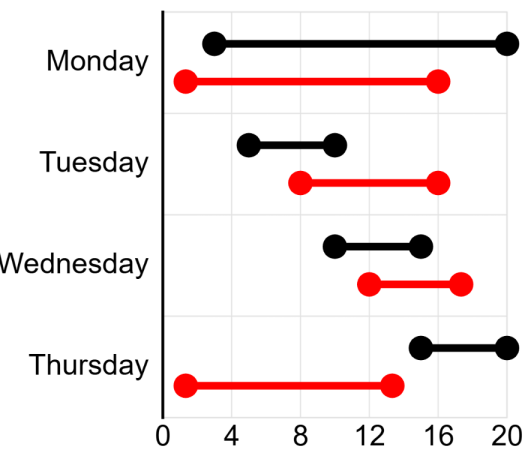
The data for the dumbbell chart is slightly different to a Bar chart in that there are two or more scale values given and these values are the points that you will see marked on the chart. It's unlike a stacked Bar chart where the values are accumulative. For example, with a stacked Bar chart, if you give [3,6,8] you will see bars that go from 0-3, 3-9 and 9-17). Whereas with a dumbbell chart you will see a dumbell that starts at 3, has a section that goes up to 6 and then finishes at 8.
Here's the code that makes the dumbbell chart example above:
<script>
    new RGraph.HBar({
        id: 'cvs',
        data: [0,0,0,0],
        options: {
            yaxisLabels: ['Monday','Tuesday','Wednesday','Thursday'],
            yaxisLinewidth: 3,
            yaxisTickmarks: false,
            xaxis: false,
            marginLeftAuto: false,
            marginLeft: 200,
            textSize: 23,
            yaxisLabelsOffsetx: -10,
            xaxisScaleMax: 20
        }
    }).draw();


    new RGraph.HBar({
        id: 'cvs',
        data: [[3,20],[5,10],[10,15],[15,20]],
        options: {
            variant: 'dumbbell',
            // variantDumbbellLinewidth: 4,
            // variantDumbbellEndLeft: false,
            // variantDumbbellEndRight: false,
            // variantDumbbellEndLeftRadius: null,
            // variantDumbbellEndRightRadius: null,
            // variantDumbbellEndRadius: 15,
            shadow: false,
            colors: ['#000'],
            textSize: 23,
            yaxisLinewidth: 3,
            yaxisTickmarks: false,
            yaxisLabelsOffsetx: -5,
            xaxis: false,
            xaxisScale: false,
            yaxis: false,
            backgroundGrid: false,
            xaxisLabelsCount: 4,
            marginLeftAuto: false,
            marginLeft: 200,
            marginTop: 15,
            marginBottom: 55,
            tooltips: ['Jim (b)','Berty (b)','Lois (b)','Cava (b)'],
            tooltipsOffsety: 10
        }
    }).grow();

    new RGraph.HBar({
        id: 'cvs',
        data: [[1,12],[6,12],[9,13],[1,10]],
        options: {
            variant: 'dumbbell',
            shadow: false,
            colors: ['red'],
            yaxis: false,
            xaxis: false,
            xaxisScale: false,
            backgroundGrid: false,
            marginLeftAuto: false,
            marginLeft: 200,
            marginTop: 55,
            marginBottom: 15,
            marginInner: 35,
            tooltips: ['Jim (r)','Berty (r)','Lois (r)','Cava (r)'],
            tooltipsOffsety: 10
        }
    }).grow();
</script>